


Why Is My RC Car Overheating? Motor, ESC and Gearing Fixes
By Hobbyco Editorial Team · · 12 min read
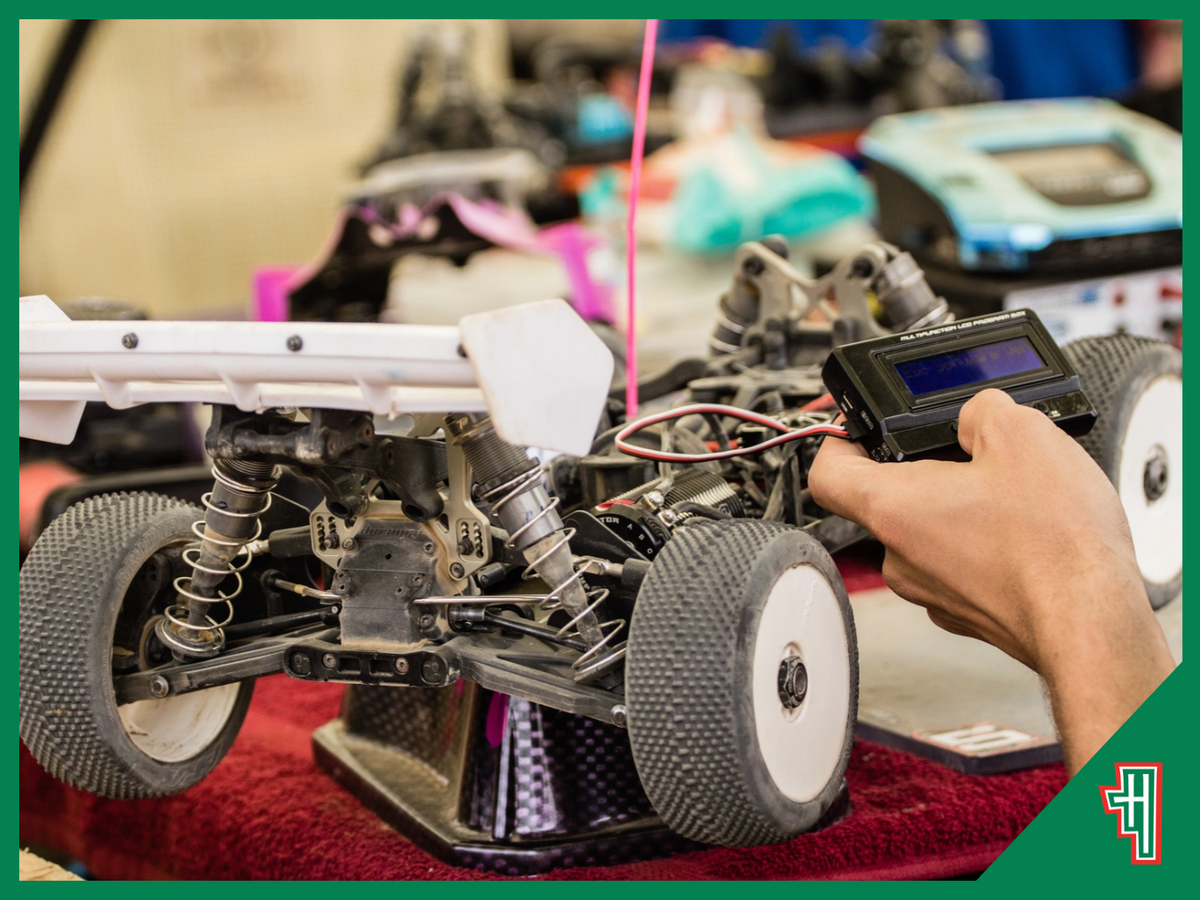
Heat is normal in an electric RC car, but repeated thermal shutdowns, a sharp loss of power, a burning smell or components that become unusually hot are warnings to stop. Learning how to stop RC car overheating begins with identifying which part is producing the heat. A hot motor, electronic speed controller, battery or connector can point to a different problem.
TL;DR
-
Stop driving if power drops, thermal protection activates, wiring smells hot or a battery swells, vents or becomes damaged.
-
Disconnect the battery when safe and let the car cool naturally on a non-flammable surface.
-
Measure the motor, ESC and battery separately. Follow the limits and measurement points in the vehicle and electronics manuals.
-
Check for grass, stones, tight gear mesh, seized bearings, dragging brakes and other drivetrain resistance.
-
Return to the factory gearing or the manufacturer’s approved chart before experimenting with pinion and spur changes.
-
Confirm that the battery voltage, motor, ESC, connectors, tyres and vehicle weight are compatible.
-
Restore airflow, clean fans and vents, and use only correctly fitted cooling parts approved for the system.
-
Test one change at a time with short runs and temperature checks under the same conditions.
Stop Safely Before Diagnosing the Heat

Do not continue driving through a thermal cutback. Bring the car to a safe stop, switch it off according to its manual and disconnect the battery if it is safe to handle. Place the model away from dry grass, fabric and other combustible material while it cools. Do not put a hot battery or electronic component in water, a refrigerator or a freezer.
If a LiPo battery is swollen, hissing, leaking, unusually hot, damaged or giving off an unusual odour, move away from it and follow the battery manufacturer’s emergency guidance. Do not charge or reuse a questionable pack. A fireproof charging bag is useful for appropriate charging and storage routines, but it does not make a damaged battery safe.
Find Out Which Component Is Overheating

Feeling the body shell or chassis does not tell you where the fault begins. Use an infrared thermometer or the model’s compatible telemetry system, then measure the motor can, ESC and battery at consistent points immediately after a short test. Infrared readings vary with surface finish, distance and angle, so use them for repeatable comparisons and follow the manual’s specified method.
A universal temperature limit is unreliable. ESC protection thresholds vary by model, firmware and sensor location. Some controllers reduce power when their internal threshold is reached, while others cut output and signal the event with an LED pattern. Motor and battery limits also vary. Use the lowest applicable limit stated by the vehicle, motor, ESC and battery manufacturers.
|
What becomes hot |
Likely areas to check |
Useful first action |
|---|---|---|
|
Motor |
Gearing, drivetrain drag, tyre size, vehicle weight, timing and repeated acceleration |
Return to the approved setup and confirm the drivetrain rolls freely |
|
ESC |
Motor load, current demand, programming, fan operation, airflow and controller rating |
Read the fault code, restore stock settings and inspect the cooling system |
|
Battery |
Pack condition, current demand, connector resistance, incorrect specification and over-discharge |
Stop using a damaged pack and verify the approved battery specification |
|
Plug or wire |
Loose contact, corrosion, poor solder joint, undersized lead or incompatible adaptor |
Disconnect the battery and replace or repair the connection correctly |
Write down ambient temperature, surface, battery, gearing, tyre size, run time and the reading from each component. This makes RC motor overheating easier to reproduce and prevents random changes from hiding the real cause.
Fix RC Motor Overheating
RC motor overheating usually means the motor is being asked to produce more torque or current than the setup can comfortably sustain. A larger pinion, smaller spur, taller tyres, heavier body or added accessories can increase the load. Repeated hard launches, long grass, soft sand, steep climbs and constant low-speed work can add heat even when the car feels fast and responsive.

Return to Approved Gearing
Start with the original pinion and spur combination or a pairing listed in the model’s gearing chart. On a conventional pinion-and-spur drivetrain, a smaller motor pinion or larger spur will usually reduce the load and top speed while improving acceleration. However, transmission design and manufacturer terminology differ, so follow the chart rather than relying only on phrases such as ‘gear up’ or ‘gear down’.
Optional speed gearing may be intended for brief high-speed passes on a hard surface, not grass, repeated starts or continuous off-road driving. Traxxas manuals, for example, warn that speed-focused gearing increases heat and that motor, battery and speed-control temperatures should be monitored. Treat any optional gearing as condition-specific.
Check Gear Mesh and Drivetrain Resistance
Gear mesh that is too tight can create friction, noise and heat. Mesh that is too loose can damage the teeth and deliver power unevenly. Set it using the vehicle manufacturer’s procedure, then rotate the drivetrain by hand with the battery disconnected. It should move smoothly without a tight spot.
Remove grass, hair, string and stones from axles, driveshafts and gear covers. Check bearings, differentials, wheel nuts, brakes and slipper settings where applicable. A bent shaft or seized bearing can make a correctly geared motor run hot. After reassembly, verify that all four wheels rotate as expected and that nothing rubs the body or suspension.
Review Motor Timing and Condition
Advanced timing can raise speed and current demand, which can also raise temperature. Restore the motor and ESC to manufacturer-recommended timing before troubleshooting. For a sensored system, inspect the sensor lead and settings. For a brushed motor, worn brushes, a damaged commutator or unsuitable gearing may contribute to heat. Service only as the motor instructions permit.
Control RC ESC Temperature

The ESC supplies power to the motor, so a hot controller may be reacting to excessive motor current rather than causing the problem by itself. Compare RC ESC temperature with motor and battery readings from the same run. A cool motor beside a very hot ESC can suggest poor controller cooling, unsuitable programming, a damaged fan or an ESC that is undersized for the application.
Read the Thermal Warning Correctly
Check the LED or beep code in the exact ESC manual. Thermal protection can resemble low-voltage cutoff or signal-loss behaviour. Some Hobbywing controllers reduce output at a preset internal temperature and restore full power only after cooling. The threshold and indicator vary between product families, so do not diagnose an ESC from a generic light pattern.
Never disable thermal protection simply to prevent a shutdown. The protection is warning that the controller has reached its configured limit. Removing the warning does not remove the heat and may expose the electronics to damage.
Restore Sensible Programming
Reset boost, turbo timing, punch, drag brake and motor timing to the vehicle or ESC maker’s baseline. Aggressive timing can increase current and temperature. Strong drag brake or repeated heavy braking can add controller load. Recalibrate the throttle range so the ESC reads neutral, full throttle and full brake correctly.
Verify that the ESC supports the battery cell count, motor type and motor limit. Also check its continuous and peak ratings under the manufacturer’s stated conditions. A connector that physically fits does not prove electrical compatibility. When RC ESC temperature remains excessive at stock settings, discontinue testing until the system has been checked.
Improve Airflow Without Hiding the Cause

Cooling helps a healthy power system manage normal heat, but a fan cannot correct binding, over-gearing or incompatible electronics. Clean mud and dust from the motor can, heatsink, ESC vents and fan blades. Confirm that the fan starts when expected and that its wire, plug and voltage match the ESC’s accessory output.
Hot Australian summer conditions can shorten the safe run time. Test earlier in the day, take longer breaks and reduce the load when ambient temperature is high. Water contact may temporarily change a temperature reading, so do not use wet running as proof that a gearing setup is safe when dry.
Check the Battery, Connectors and Wiring

A battery can become warm under load, but unusual heat, swelling, voltage imbalance or rapid loss of performance needs attention. Confirm the chemistry, cell count, capacity, discharge capability, connector, dimensions and polarity required by the vehicle. Use a compatible charger and the battery maker’s charging, storage and inspection rules.
High resistance at a plug or solder joint turns electrical energy into heat. With the battery disconnected, inspect connectors for looseness, corrosion, darkening, melted plastic and exposed wire. Adaptors add more contact points and can introduce resistance or an incorrect polarity. Replace damaged parts with the specified connector and suitable wire rather than repeatedly bending or squeezing a failed contact.

Do not assume that a battery with a higher cell count is a safe performance upgrade. More voltage can raise motor speed and system load, especially if gearing and tyres remain unchanged. The motor, ESC, fan, receiver and drivetrain must all support the proposed setup. Hobbyco’s RC parts and accessories range can help you identify available replacement categories, but the exact model, part number and electrical specification remain the final compatibility checks.
Match the Setup to the Surface and Driving Style
A setup that runs comfortably on smooth pavement may overheat in thick grass or sand. Large tyres, deep tread and high grip increase rotating load. Tall grass can wrap around shafts and restrict the wheels. Crawling slowly under heavy load also demands torque, while repeated launches and braking create current spikes.
Reduce run length during testing and include cooling pauses. Use smooth throttle where conditions allow, and avoid holding full throttle when the car is stuck. If the vehicle is designed for speed runs, follow the maker’s surface, tyre, battery and gearing conditions. If it is a crawler, use the recommended motor, ESC mode and gearing for sustained low-speed work.
Use a Repeatable Troubleshooting Process

Randomly fitting a fan, changing the pinion and replacing the battery at the same time may reduce heat, but it will not show which change solved the fault. Use this sequence to learn how to stop RC car overheating with evidence.
-
Return the vehicle to its approved baseline battery, gearing, tyres, motor timing and ESC settings.
-
Disconnect the battery and confirm that the drivetrain, bearings, wheels and gears move freely.
-
Inspect the motor, ESC, fan, connectors and wires for contamination, damage or loose mounting.
-
Charge a known-good compatible battery using the correct charger and settings.
-
Record the ambient temperature and take a short, gentle test on the normal surface.
-
Stop before thermal protection activates and measure the motor, ESC and battery consistently.
-
Change only one factor, such as returning to a smaller approved pinion, then repeat the same test.
-
Compare run time, component readings and behaviour. Stop if any damage, swelling or unusual smell appears.
If the vehicle stays cool during a gentle test but overheats during ordinary use, the load, terrain or gearing may be too demanding. If it heats rapidly even at the approved baseline, a component may be failing or incorrectly installed. A qualified hobby technician or the manufacturer can help test electronics that cannot be safely isolated at home.
Know When to Replace a Part or Ask for Help
Seek help when component limits are unclear, the car has non-standard electronics, wiring has been modified, or the fault appears after an impact or water exposure. Bring the model number, motor and ESC details, battery specification, gearing, tyre size and recorded temperatures. That information is more useful than saying only that the car ‘runs hot’.
For broader information about radio systems, vehicle types and common ownership questions, read Hobbyco’s 10 FAQs About RCs. Keep model-specific troubleshooting tied to the manual for your exact car and installed electronics.
Keep Heat Under Control
The reliable answer to how to stop RC car overheating is to reduce the cause of the load before adding more cooling. Identify the hot component, return to an approved setup, remove drivetrain resistance, confirm electrical compatibility and test one change at a time. Cooling fans and heatsinks then support a sound system rather than masking a fault.
Recheck RC motor overheating and RC ESC temperature whenever you change gearing, tyres, battery voltage, motor timing, vehicle weight or driving surface. A short temperature check after a modification is faster and less expensive than replacing a damaged motor, ESC or battery.
Frequently Asked Questions
How hot is too hot for an RC car motor?
Use the limit in the exact motor or vehicle manual and measure at the specified location. Motor construction, sensor position and operating conditions vary. Some manufacturers publish a maximum or a recommended target, but that figure should not be transferred to unrelated motors. Stop early if performance drops, odour appears or the temperature rises unusually quickly.
Why does my RC car overheat only on grass?
Grass creates more rolling resistance than smooth pavement and can wrap around axles or driveshafts. The motor and ESC must draw more current to maintain speed. Use manufacturer-approved gearing for the surface, remove trapped debris, shorten the run and check temperatures. Avoid driving where grass blocks cooling openings.
Will a cooling fan fix RC motor overheating?
A correctly fitted fan can improve airflow, but it will not fix tight gear mesh, seized bearings, over-gearing, excessive timing or incompatible electronics. Correct the load first. Then use a fan or heatsink designed for the motor, available space and power supply, following the manufacturer’s installation guidance.
Why does my RC ESC temperature rise faster than the motor temperature?
Possible causes include restricted ESC airflow, a failed fan, aggressive programming, heavy braking, unsuitable motor pairing or a controller that is undersized for the load. Read the ESC fault code, restore approved settings and verify the full system specification. Stop testing if thermal protection repeatedly activates.
Should I use a smaller pinion to stop an RC car overheating?
On many conventional pinion-and-spur systems, a smaller pinion reduces load and heat, but use only combinations approved in the model’s gearing chart. Confirm gear mesh after the change and retest the motor, ESC and battery. Other drivetrain layouts can require different instructions.
You may also like

RC Car Maintenance Checklist: What to Check After Every Run
A short inspection after a drive can reveal a loose wheel nut, trapped stone or damaged tyre before it becomes a larger repair. The routine does not mean dismantling the car after every battery pack. Clean only as much as conditions require,...

How to Bind an RC Transmitter and Receiver: Troubleshooting Guide
A receiver that refuses to link can stop a new build before the first run, but the cause is often simple: an incompatible protocol, the wrong model memory, weak receiver power or a missed bind-mode step. The safest solution is a methodical...

7 Best Spring Hobbies for Kids in Australia
Spring in Australia brings warmer weather, longer afternoons and plenty of opportunities for children to explore new interests. The right hobby can encourage creativity, improve concentration and give kids something meaningful to enjoy beyond screens. From racing radio control cars outside to...
Comments